

Note
Go to the end to download the full example code.
Emplace a crater a specific distance and bearing from the center of a HiResLocalSurface#
By David Minton
This example shows how to emplace a crater at a specific distance and bearing from the center of a HiResLocalSurface using the new relative_location arguments that can be passed to the emplace method. This is useful to place a crater on a HiResLocalSurface at a specific location relative to the center without trying to figure out what lat,lon coordinates to use. In this example, we will emplace a sequence of craters in a spiral pattern. This not meant to be a realistic planetary surface, but it looks pretty cool!
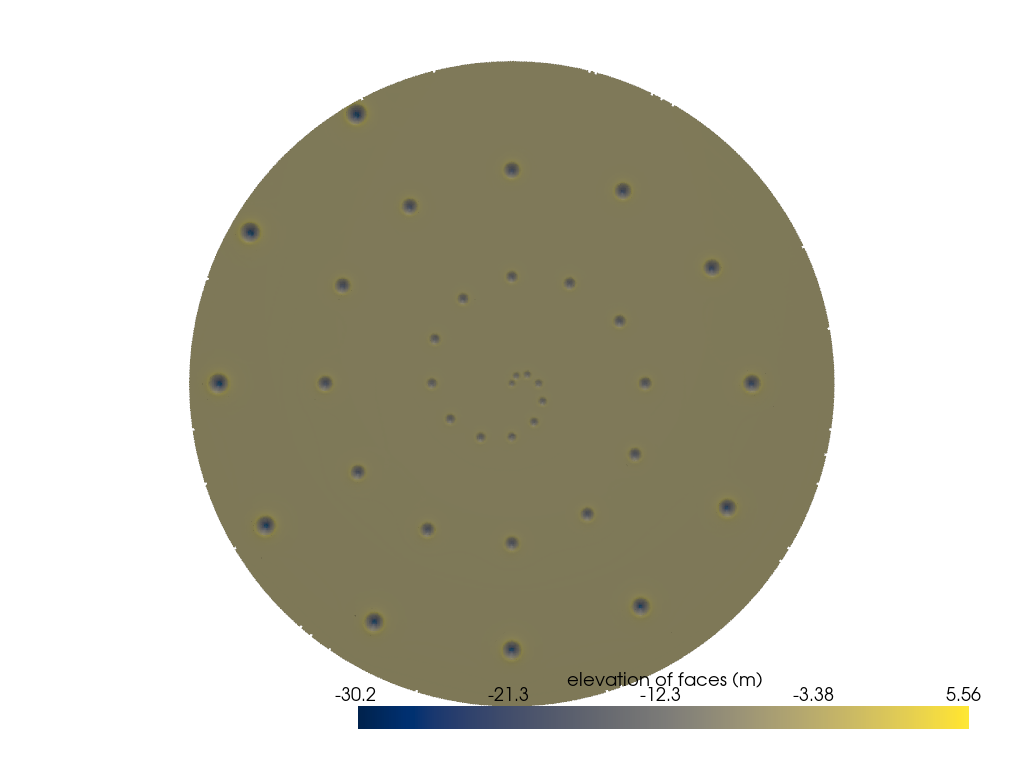
Generating a new grid.
Creating a new grid
Center of local region: (0.0, 0.0)
Radius of local region: 2.000 km
Local region pixel size: 10.00 m
Generated 125579 points in the local region.
Generated 26779 points in the superdomain region.

Queueing craters for emplacement:   0%|          | 0/1 [00:00<?, ?crater/s]


Queueing craters for emplacement:   0%|          | 0/1 [00:00<?, ?crater/s]


Queueing craters for emplacement:   0%|          | 0/1 [00:00<?, ?crater/s]


Queueing craters for emplacement:   0%|          | 0/1 [00:00<?, ?crater/s]


Queueing craters for emplacement:   0%|          | 0/1 [00:00<?, ?crater/s]


Queueing craters for emplacement:   0%|          | 0/1 [00:00<?, ?crater/s]


Queueing craters for emplacement:   0%|          | 0/1 [00:00<?, ?crater/s]


Queueing craters for emplacement:   0%|          | 0/1 [00:00<?, ?crater/s]


Queueing craters for emplacement:   0%|          | 0/1 [00:00<?, ?crater/s]


Queueing craters for emplacement:   0%|          | 0/1 [00:00<?, ?crater/s]


Queueing craters for emplacement:   0%|          | 0/1 [00:00<?, ?crater/s]


Queueing craters for emplacement:   0%|          | 0/1 [00:00<?, ?crater/s]


Queueing craters for emplacement:   0%|          | 0/1 [00:00<?, ?crater/s]


Queueing craters for emplacement:   0%|          | 0/1 [00:00<?, ?crater/s]


Queueing craters for emplacement:   0%|          | 0/1 [00:00<?, ?crater/s]


Queueing craters for emplacement:   0%|          | 0/1 [00:00<?, ?crater/s]


Queueing craters for emplacement:   0%|          | 0/1 [00:00<?, ?crater/s]


Queueing craters for emplacement:   0%|          | 0/1 [00:00<?, ?crater/s]


Queueing craters for emplacement:   0%|          | 0/1 [00:00<?, ?crater/s]


Queueing craters for emplacement:   0%|          | 0/1 [00:00<?, ?crater/s]


Queueing craters for emplacement:   0%|          | 0/1 [00:00<?, ?crater/s]


Queueing craters for emplacement:   0%|          | 0/1 [00:00<?, ?crater/s]


Queueing craters for emplacement:   0%|          | 0/1 [00:00<?, ?crater/s]


Queueing craters for emplacement:   0%|          | 0/1 [00:00<?, ?crater/s]


Queueing craters for emplacement:   0%|          | 0/1 [00:00<?, ?crater/s]


Queueing craters for emplacement:   0%|          | 0/1 [00:00<?, ?crater/s]


Queueing craters for emplacement:   0%|          | 0/1 [00:00<?, ?crater/s]


Queueing craters for emplacement:   0%|          | 0/1 [00:00<?, ?crater/s]


Queueing craters for emplacement:   0%|          | 0/1 [00:00<?, ?crater/s]


Queueing craters for emplacement:   0%|          | 0/1 [00:00<?, ?crater/s]


Queueing craters for emplacement:   0%|          | 0/1 [00:00<?, ?crater/s]


Queueing craters for emplacement:   0%|          | 0/1 [00:00<?, ?crater/s]


Queueing craters for emplacement:   0%|          | 0/1 [00:00<?, ?crater/s]


Queueing craters for emplacement:   0%|          | 0/1 [00:00<?, ?crater/s]


Queueing craters for emplacement:   0%|          | 0/1 [00:00<?, ?crater/s]


Queueing craters for emplacement:   0%|          | 0/1 [00:00<?, ?crater/s]


Converting xarray Dataset to Crater objects:   0%|          | 0/36 [00:00<?, ?crater/s]
import cratermaker as cm

simdir = "simdata-1_6"

# Note, that for these examples we pass ask_overwrite=False and reset=True to the Simulation constructor. This will suppress
# prompts that ask the user if they want to overwrite existing files, which would would prevent these examples from running on their
# own when building the documentation pages. Alternatively, calling cm.cleanup(simdir) will remove all pre-existing output files.
sim = cm.Simulation(
    surface="hireslocal",
    simdir=simdir,
    local_location=(0, 0),
    pix=10.0,
    local_radius=2000.0,
    do_counting=False,
    ask_overwrite=False,
    reset=True,
)

# Emplace craters in a spiral pattern with craters getting slightly largers as they get farther from the center
total_rotation = 3 * 360.0
ncraters = 36
bearing_spacing = int(total_rotation / ncraters)
distance_spacing = sim.surface.local_radius / ncraters
for i in range(ncraters):
    bearing = i * bearing_spacing
    distance = i * distance_spacing
    diameter = 50.0 + i * 2.5
    sim.emplace(diameter=diameter, relative_location={"distance": distance, "bearing": bearing})

# Use the "c" key to show the circle representing the crater
sim.show3d(variable_name="face_elevation", cmap="cividis")
Total running time of the script: (0 minutes 35.478 seconds)