

Note
Go to the end to download the full example code.
Crater scaling for various planetary surfaces#
By Dennise Valadez and David Minton
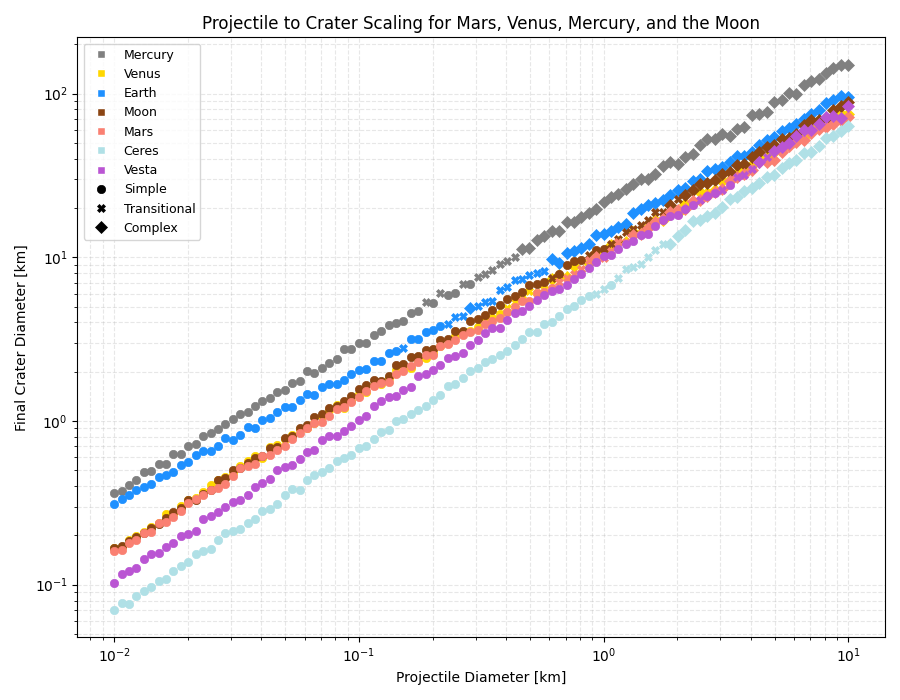
This example demonstrates how to use the Scaling class to calculate the final crater diameter for different planetary bodies. Normally, the scaling component would not be invoked manually like this. Instead, the scaling model is used internally by the Crater component. This example demonstrates how the scaling model can be used on its own.
This example uses the default “montecarlo” scaling model, in which some of the scaling relationships are randomly varied for each computation. It also uses the default Projectile model, which draws projectile velocities and angles at random from distributions. Therefore, the results will be slightly different each time it is run.
import matplotlib.pyplot as plt
import numpy as np
from matplotlib.lines import Line2D

from cratermaker import Scaling

bodies = ["Mercury", "Venus", "Earth", "Moon", "Mars", "Ceres", "Vesta"]
proj_diameters = np.logspace(1, 4, 100)
markersize = 6
# Define different marker styles for each body
markerstyles = ["o", "X", "D"]
morphology_types = ["simple", "transitional", "complex"]
markerstyle_map = dict(zip(morphology_types, markerstyles))
colors = ["gray", "gold", "dodgerblue", "saddlebrown", "salmon", "powderblue", "mediumorchid"]
color_map = dict(zip(bodies, colors))

fig, ax = plt.subplots(figsize=(9, 7))
ax.set_xscale("log")
ax.set_yscale("log")
ax.set_xlabel("Projectile Diameter [km]")
ax.set_ylabel("Final Crater Diameter [km]")
ax.set_title("Projectile to Crater Scaling for Mars, Venus, Mercury, and the Moon")

color_index = 0
label_color_map = {}

for body in bodies:
    scaling = Scaling.maker(target=body)
    crater_diams = []
    morphs = []

    for d in proj_diameters:
        scaling.projectile.new_projectile()
        scaling.recompute()
        transient_diameter = scaling.projectile_to_transient(d)
        diameter, morphology_type = scaling.transient_to_final(transient_diameter)
        crater_diams.append(diameter)
        morphs.append(morphology_type)

    for morph in morphology_types:
        mask = np.array(morphs) == morph
        label = f"{body} - {morph.capitalize()}"

        ax.plot(
            proj_diameters[mask] * 1e-3,
            np.array(crater_diams)[mask] * 1e-3,
            markerstyle_map[morph],
            markersize=markersize,
            linestyle="None",
            label=label,
            color=color_map[body],
            markeredgewidth=0.5,
        )


# Legend for planetary bodies (color only)
body_legend = [
    Line2D([0], [0], marker="s", color="w", label=body, markerfacecolor=color_map[body], markersize=markersize) for body in bodies
]

# Legend for morphology types (symbol only, black color)
morph_legend = [
    Line2D(
        [0],
        [0],
        marker=markerstyles[i],
        color="k",
        label=morph.capitalize(),
        linestyle="None",
        markersize=markersize,
        markeredgewidth=0.5,
    )
    for i, morph in enumerate(morphology_types)
]

# Add the legends to the plot
ax.legend(handles=body_legend + morph_legend, fontsize=9, loc="best")

ax.grid(True, which="both", linestyle="--", alpha=0.3)
plt.tight_layout()
plt.show()
Total running time of the script: (0 minutes 1.456 seconds)