


Production#
Cratermaker’s production module provides a robust way to compute the production function for craters and projectiles. The production function is defined as the cumulative number of craters greater than a given diameter per unit m² surface area. There are currently two types of production funcitons that are available in the Production class: “neukum” and “powerlaw”. The default production model depends on the value of the target. If the target is one of the inner planets (or Vesta or Ceres), the default will be “neukum”. For all other bodies, it is “powerlaw”. The “neukum” production function comes in three different versions: “moon”, “mars”, or “projectile.” The “projectile” version is used unless the target is either the Moon or Mars. The default Cratermaker target body is the Moon, and therefore the default production function is “neukum” with the “moon” model. We can create a production function object and inspect its values using the following code:
In [1]: from cratermaker import Production

In [2]: production = Production.maker()

In [3]: print(production)
<NeukumProduction>
Generator type crater
Diameter range: 0 m to inf km
N(D) units: N>D(km) per 10⁶ km²
Number of quasi-Monte Carlo craters: 0
Version: Moon
Valid Time Range: 0 My - 4.500 Gy
Valid Diameter Range: 10.00 m - 1000.0 km
The output shows that by default, the production function is the Neukum model for the Moon, which is described in Neukum, Ivanov, and Hartmann (2001) [1]. It also reports that the “Generator type” is “crater.” A production model can either a crater generator or a projectile generator, which means that the diameter values that are returned from the production function represent either the crater or projectile. The other crater-based model is the Mars version, which is based on the work of Ivanov (2001) [2]. The projectile model is based on the work of Ivanov, Neukum, and Wagner (2001) [3].
The Neukum Moon model has a valid range of ages over which it is valid, which is also reported in the output. The valid range of ages is between 0 and 4.5 Ga, though caution must be used when interpreting ages older than about 3.9 Ga, as these are poorly calibrated. The total crater number density of the most ancient terrains on the Moon correspond to a model age of 4.31 Ga, though the actual crust could potentially be must older than that. Nevertheless, the Neukum model is a well-established and widely used model for inner solar system crater chronology.
The Production class has two primary methods that are used to compute the production function. The first is Production.function(), which computes the expected cumulative number density of craters greater than a given diameter of a surface of a given age.
The second is Production.sample(), which samples crater diameters and ages from the production function using Monte Carlo methods.
Production function#
Production.function() returns the cumulative size-frequency distribution (CSFD) of craters over a given age range and crater diameter. It takes the following arguments:
diameter: Crater diameter(s) in units of meters to compute corresponding cumulative number density value.
time_start: Starting time in units of My relative to the present, used to compute the CSFD. Default is
1.0, corresponding to 1 Ma. Alternatively age can be used as an alias for time_start.time_end: Ending time in units of My relative to the present, also used to compute the CSFD. Default is
0.0, which corresponds to the present day.
Example: Using Production.function#
For this example, we are going to use Production.function() to find the cumulative number of craters greater than 1 km² to form on a surface in 3 Gy using a power law with a slope of -2.
In [4]: from cratermaker import Production

In [5]: production = Production.maker("powerlaw",slope=-2.0)

In [6]: diameter = 1000.0

In [7]: age = 3000.0

In [8]: n = production.function(diameter=diameter,age=age)

In [9]: print(f"{n*1e6:.2f} D>{diameter*1e-3:.0f} km craters per km² in {age*1e-3:.0f} Gy")
23.65 D>1 km craters per km² in 3 Gy
Example: Plot a power law production function with a slope of -3 for craters 1 m to 100 km over 1 Ga#
In [10]: from cratermaker import Production

In [11]: import matplotlib.pyplot as plt

In [12]: import numpy as np

In [13]: fig, ax = plt.subplots()

In [14]: ax.set_xlabel('D (m)')
Out[14]: Text(0.5, 0, 'D (m)')

In [15]: ax.set_ylabel('$\\mathregular{N_{>D}}$')
Out[15]: Text(0, 0.5, '$\\mathregular{N_{>D}}$')

In [16]: production = Production.maker("powerlaw", slope=-3.0)

In [17]: diameters = np.arange(1, 1e6)

In [18]: pf = production.function(diameter=diameters, age=1000.0)

In [19]: ax.loglog(diameters, pf)
Out[19]: [<matplotlib.lines.Line2D at 0x756b57b6e5d0>]

In [20]: plt.show()

Example: Using Production.age_from_D_N#
Production.age_from_D_N() returns the age in My for a given crater number density and diameter. It has the following parameters:
diameter: Diameter of the crater in m
cumulative_number_density: Number density of craters per m² surface area greater than the input diameter.
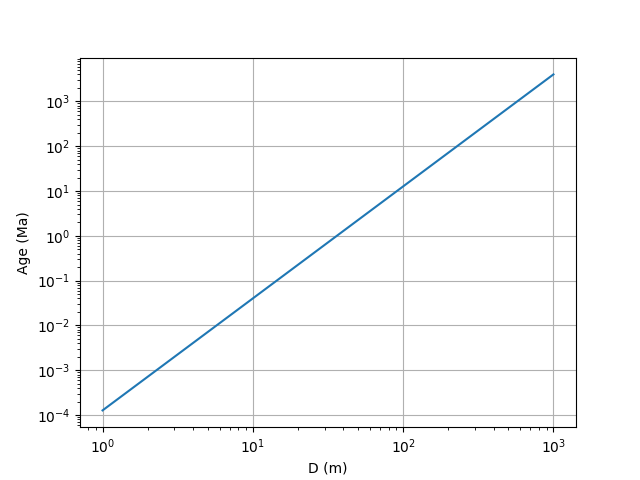
For this example, we are going to use Production.age_from_D_N() to plot the age in Ma for a number density of 10-6 craters per m² from 1 m to 1 km in diameter.
In [21]: from cratermaker import Production

In [22]: import matplotlib.pyplot as plt

In [23]: import numpy as np

In [24]: production = Production.maker("powerlaw", slope=-2.5)

In [25]: diameters = np.logspace(0, 3)

In [26]: cumulative_number_density = np.full_like(diameters, 1e-6)

In [27]: age = production.age_from_D_N(diameter=diameters, cumulative_number_density=cumulative_number_density)

In [28]: def plot_inv(diameter, age):
   ....:    fig, ax = plt.subplots()
   ....:    ax.set_xlabel('D (m)')
   ....:    ax.set_ylabel('Age (Ma)')
   ....:    ax.loglog(diameters, age)
   ....:    ax.grid(True)
   ....:    return fig
   ....:

In [29]: fig = plot_inv(diameters, age)

In [30]: plt.show()
Using the Production component in a Simulation#
In the above guides we have shown how to use the Production as a standalone object. However, the preferred way of initializing and using this object is as part of a Simulation object, where it is initialized in tandem with all other components in the Cratermaker project. This allows the components to be checked for self-consistency, and streamlines some of the initialization issues. Here we will demonstrate some typical use-cases for Production, including how the valid ranges are dynamically adjusted for the particular Surface and how the Quasi Monte Carlo functionality allows the user to mix real craters with known properties with randomly-generated craters into a simulation.
Emplace a population of craters drawn from a production function#
The Simulation.populate() is used to generate a population of craters drawn from whichever Production component module is loaded into the simulation. You can pass either time interval over which to draw from the production function with either “age” or “time_start” and “time_end”, or you can provide a pair of numbers in the form of (D,N) that represents the production function in the N(D) convention. For instance, to emplace a population of craters corresponding to the production function between 200 My to 100 My before present, you would do:
sim.populate(time_start=200, time_end=100)
The Simulation.populate() method is really meant to be a helper method for the Simulation.run() method, which is used to run a full simulation over a specified time interval. For instance, the Simulation.populate() method does not track the time of emplacement or advance the time interval of the simulation.
Limiting the size range of the production population#
When used inside a Simulation, the upper and lower bounds on the sizes of craters returned by Production.function() are set by the resolution of the associated Surface object. The smallest crater that is directly modeled (outside of any subpixel models) is the size of the local face. The largest size is the diameter of the target. These can be adjusted by the user and are access by the smallest_crater and largest_crater attributes.
In [31]: from cratermaker import Simulation

In [32]: sim = Simulation(gridlevel=5)
Creating a new grid
Generating a mesh with icosphere level 5.

In [33]: sim.smallest_crater
Out[33]: 57287.49494015205

In [34]: sim.largest_crater
Out[34]: 3475060.0
Quasi Monte Carlo craters#
For some applications, you may want to specify a predefined population of craters that should be emplaced at a certain time and location along with the random population of craters drawn from the production function. To accomplish this, you can initialize a Simulation object with an argument quasimc_file, which points to either a CSV or NetCDF file containing the information needed to emplace the craters. Alternatively, you When this argumented is passed, the Simulation.run() method will run in “Quasi Monte Carlo mode”.
Quasi Monte Carlo mode is a powerful tool that is very flexible. Here we will demonstrate the different ways you can specify craters in either a file via the quasimc_file property, or a list of Crater objects provided to the quasimc_craters property. The Simulation class also has its own wrappers for these two properties, quasimc_file and quasimc_craters for convenience.
Here we have some demonstrations of the different ways to set Quasi Monte Carlo craters, and how different parameters affect the behavior of the simulation with a simple donstration using several prominent lunar craters: South Pole-Aitken, Serenitatis, Nectaris, Crisium, Imbrium, Schrödinger, and Orientale. A version of this simulation type with 76 lunar basins and craters is included in the Simuation and Visualization.
First, we we will create a CSV file called “qmc_inputs.csv” and populate it with columns indicating which arguments should be passed to the Crater.maker() function. At a minimum, this requires at least one argument specifying size, such as diameter or projectile_diameter Usually you would include a location as well, which must be specified with “longitude” and “latitude” as separate columns, rather than the typical location tuple that the method call would use. In addition, you typically would provide some indication of when in the simulation you want the crater to form. There are multiple ways to do this, which we will demonstrate using ancient lunar basins.
Note
We used the following sources for constructing our Quasi Monte Carlo constraints. This is an updated set of constraints from those used by Blevins et al. (2025) [4].
The oldest crater in the file is South Pole Aitken basin, which we have given an N(20) of 999.8 per 10⁶ km² and a sequence number of 0. This puts it just after our chosen simulation start time in terms of NPF model years.
The 74 largest and oldest crater names, sizes, and impact locations are those determined using GRAIL-derived gravity data from Neumann et al. (2015) [5]
Sequence numbers are determined by stratigraphic relationships from Wilhelms et al. (1987) [6] and Fassett et al. (2012) [7]
Fecunditatis and Australe North are assigned N(90) values from Evans et al. (2018) [8].
We do not consider the evidence for Procellarum being an impact basin as particularly strong, and so we do not include it.
Basins with N(20) values or those with stratigraphic sequences but no ages are taken from Orgel et al. (2018) [9].
Imbrium is set to 3922±12 My based on U-Pb ages of Apollo 14 and 15 impact breccias from Nemchin et al. (2021) [10].
The age of Copernicus of 800±15 My is from Bogard et al. (1994) [11], and is based on 39Ar - 40Ar ages of Apollo 12 soil samples that are thought to have been reset by ejecta from Copernicus.
The age of Tycho of 109±4 My is based on cosmic ray exposure dating of the South Massif landslide deposit in Taurus Littrow Valley from Apollo 17 by Drozd et al. (1977) [12].
Serenetatis is given an age of 4250 My based on modeling the origin of the Apollo 17 troctolite 76535 (which we think is The Most Interesting Rock from the Moon) by Bjonnes et al. (2025) [13]. However, this is still a proposed age and because it would represent a date that is not part of the calibration used to develop the Neukum chronology function, then it may not be consistent with its position in the lunar chronology. Alternatively, Orgel et al.’s N(20)=334±73 could be used instead.
Specifying an emplacement time#
Setting production_time specifies the time when the crater should form along with an optional 1σ standard deviation value. When passing this to Crater.maker() this can be specified as either a single value or a pair of values, where the first value represents the time and the second the standard deviation, both in units of My. The actual time value will be drawn from a normal distribution, unless you only pass a single value to production_time.
In [35]: from cratermaker import Simulation

In [36]: sim = Simulation(gridlevel=5)
Creating a new grid
Generating a mesh with icosphere level 5.

In [37]: sim.quasimc_craters.append(sim.Crater.maker(name="Imbrium", diameter=1321e3, location=(341.5, 37), production_time=(3922, 12)))

In [38]: print(sim.quasimc_craters[-1])
<BasicMoonCrater>
ID: 2954617299
Name: Imbrium
Diameter: 1321.0 km
morphology_type: complex
transient_diameter: 769.0 km
projectile_diameter: 297.5 km
projectile_mass: 3.1015e+19 kg
projectile_density: 2250 kg/m³
projectile_velocity: 8.857 km/s
projectile_angle: 36.6°
projectile_direction: 108.2°
location (lon,lat): (-18.5000°, 37.0000°)
Production time: 3.922 Gy ± 12.00 My
Emplacement time: 3.924 Gy
Ejecta region maximum radius: 5458.6 km
Large enough to be emplaced on the grid: True
Face index of crater center: 1545
----------------------------------------
Crater region: <LocalSurface>
Location: -18.50°, 37.00°
Region Radius: 990.8 km
Number of faces: 912
Number of nodes: 1927
----------------------------------------
Ejecta region: <LocalSurface>
Location: -18.50°, 37.00°
Region Radius: 5458.6 km
Number of faces: 10242
Number of nodes: 20480
----------------------------------------
Rim height: 4.151 km
Rim width: 189.8 km
Floor depth: -9.080 km
Floor diameter: 1188.9 km
Central peak height: 20.60 km
Ejecta rim thickness: 2.837 km
The equivalent in a CSV file would be:
name |
latitude |
longitude |
diameter |
production_time |
production_time_stdev |
|---|---|---|---|---|---|
Imbrium |
37 |
341.5 |
1321000 |
3922 |
12 |
Note
Always remember that crater chronology model ages are not true ages, especially for the period of time prior to 3900 My bp. It’s best to think of the model age as a way of expressing crater number density (not the other way around), and is subject to change as better calibration data is obtained. Thus a model age of 4310 My bp just means N(20)=999.8 craters per million sq. km. in the Neukum chronology function, which in reality could represent anything from the high 4400s to the mid 4200s. Getting a more precise date for the formation of South Pole-Aitken basin, which is stratigraphically the oldest surface feature known on the Moon, will likely have to wait until samples of its melt sheet are returned and dated.
Specifying a production crater number density#
Rather than a specific time, you can specify a crater’s “age” by its position on the production function using N(D) convention. This is done by setting the production_ND attribute, which is a tuple of (D, N, N_stdev), where D is the reference diameter in km, N is the cumulative number density of craters per 10⁶ km² greater than D, and N_stdev is the 1σ standard deviation of that number density. Here we will use the N(20) value of the Nectaris basin obtained by Orgel et al. (2020) using the Buffered Non-Sparseness Correction technique, which yielded an N(20)=172±20 per 10⁶ km².
Note
The N(D) convention takes D in units of km, rather than the units of m used when defining craters. To see what unit system is current set, see the N_D_units. Other conventions can be set changing D_conversion_factor and N_conversion_factor.
In [39]: sim.quasimc_craters.append(sim.Crater.maker(name="Nectaris", diameter=885e3, location=(35.1, -15.6), production_ND=(20, 172, 20)))

In [40]: print(sim.quasimc_craters[0]) # The quasimc_craters list is sorted by age, from oldest to youngest. So even though Nectaris was added after Imbrium, it is actually the oldest crater in the list, so it is at index 0.
<BasicMoonCrater>
ID: 394834151
Name: Nectaris
Diameter: 885.0 km
morphology_type: complex
transient_diameter: 544.4 km
projectile_diameter: 104.5 km
projectile_mass: 1.3451e+18 kg
projectile_density: 2250 kg/m³
projectile_velocity: 16.26 km/s
projectile_angle: 77.7°
projectile_direction: 319.7°
location (lon,lat): (35.1000°, -15.6000°)
Production N(20): 172.0000 ± 20.0000
Emplacement time: 4.047 Gy
Ejecta region maximum radius: 5458.6 km
Large enough to be emplaced on the grid: True
Face index of crater center: 1077
----------------------------------------
Crater region: <LocalSurface>
Location: 35.10°, -15.60°
Region Radius: 663.8 km
Number of faces: 434
Number of nodes: 944
----------------------------------------
Ejecta region: <LocalSurface>
Location: 35.10°, -15.60°
Region Radius: 5458.6 km
Number of faces: 10242
Number of nodes: 20480
----------------------------------------
Rim height: 3.538 km
Rim width: 135.8 km
Floor depth: -8.049 km
Floor diameter: 796.5 km
Central peak height: 14.37 km
Ejecta rim thickness: 2.109 km
The equivalent in a CSV file would be:
name |
latitude |
longitude |
diameter |
production_time |
production_time_stdev |
production_D |
production_N |
production_N_stdev |
|---|---|---|---|---|---|---|---|---|
Nectaris |
-15.6 |
35.1 |
885000 |
20 |
172 |
20 |
||
Imbrium |
37 |
341.5 |
1321000 |
3922 |
12 |
Specifying a sequence constraint#
For many craters, it is difficult to constrain their formation time, however we can bracket them stratigraphically relative to other craters. To accomplish this in Cratermaker, we can supply an integer value to the production_sequence attribute. Craters that have a sequence number must form after craters with a lower sequence number. A sequence number can be added to any crater, even if it has another piece of production metadata such as production_time or production_ND, or has none. The only constraint is that at least one crater with the lowest sequence number must have either production_time or production_ND set, otherwise there is no way to determine the earliest time boundary of the sequences.
In this example, will add the basins Fecunditatis and Vaporum. Fecunditatis was determined by Evans et al. (2018) to have N(90)=10±4 per 10⁶ km². Vaporum is stratigraphically older than Fecunditatis, but younger than South Pole-Aitken (SPA). SPA is stratigraphically the oldest crater on the Moon, so we give it a value of production_sequence of 0. Because it is the oldest, we need an additional constraint. Its absolute formation age is currently not well known. It must be younger than the Moon, so is likely less than 4500 My. There are materials older than about 4250 My that are attributed to basins other than SPA, so it is likely older than that. We will therefore constrain it to an N(20)=999.8 per 10⁶ km², which is the value of the production function at just after 4310 My bp, which we use as the model starting time of our simulation. Fecunditatis is younger than Vaporum, so we give it a sequence number of 10, and Vaporum gets a sequence number of 5, and no other constraints. We can also add sequence constraints to Nectaris and Imbrium.
Our input file for this set of craters would look like this:
name |
latitude |
longitude |
diameter |
production_time |
production_time_stdev |
production_D |
production_N |
production_N_stdev |
production_sequence |
South Pole-Aitken |
-53 |
191 |
2400000 |
20 |
999 |
0 |
|||
Vaporum |
14.2 |
3.1 |
410000 |
5 |
|||||
Fecunditatis |
-4.6 |
52 |
690000 |
90 |
10 |
4 |
10 |
||
Nectaris |
-15.6 |
35.1 |
885000 |
20 |
172 |
20 |
40 |
||
Imbrium |
37 |
341.5 |
1321000 |
3922 |
12 |
100 |
In [41]: sim = Simulation(gridlevel=5, quasimc_file="qmc_selected_basins.csv", ask_overwrite=False)

In [42]: for crater in sim.quasimc_craters:
   ....:     N20 = sim.production.function(diameter=20e3, age=crater.time) * 1e12
   ....:     N64 = sim.production.function(diameter=64e3, age=crater.time) * 1e12
   ....:     n20text = f"N(20) = {N20:.1f}"
   ....:     n64text = f"N(64) = {N64:.1f}"
   ....:     stext = f"{crater.production_sequence}" if crater.production_sequence is not None else "-"
   ....:     print(f"{crater.name:22}: {crater.time:.1f} My {n20text:15} {n64text:14} {stext:5}")
   ....:
South Pole-Aitken     : 4309.9 My N(20) = 999.0   N(64) = 97.9   0
Vaporum               : 4222.1 My N(20) = 546.9   N(64) = 53.6   5
Fecunditatis          : 4183.8 My N(20) = 420.9   N(64) = 41.3   10
Nectaris              : 4042.6 My N(20) = 162.1   N(64) = 15.9   40
Imbrium               : 3913.7 My N(20) = 70.0    N(64) = 6.9    100
Note
The numerical value of the production_sequence is only important if there are no other production metadata constraints, such as in the Vaporum example. In that case, the N(1) range corresponding to the sequence is an interpolation between bordering sequences. So in the above case, Vaporum’s nominal “age” (in N(1) value) would be determined by extrapolating the N(1) values of craters with sequence 10 (Fecunditatis) and sequence 0 (SPA). With a value of 5, Vaporum would have a nominal N(1) value exactly in the middle, though its actual value will still be drawn from a normal distribution.
Adjusting the automatic crater size limit#
By default, when a list of craters with production metadata is loaded into quasimc_craters, the upper range of the randomly-generated craters is adjusted so that it is limited to the size of the smallest crater in the quasimc_craters list. However, sometimes this is not desirable. For instance, suppose we want to add Copernicus to our list. If we didn’t change the range of craters, this would mean that the simulation would never create random craters larger than the 96 km diameter of Copernicus. We can therefore adjust the largest_crater attribute as needed.
name |
latitude |
longitude |
diameter |
production_time |
production_time_stdev |
production_D |
production_N |
production_N_stdev |
production_sequence |
South Pole-Aitken |
-53 |
191 |
2400000 |
20 |
999 |
0 |
|||
Vaporum |
14.2 |
3.1 |
410000 |
5 |
|||||
Fecunditatis |
-4.6 |
52 |
690000 |
90 |
10 |
4 |
10 |
||
Nectaris |
-15.6 |
35.1 |
885000 |
20 |
172 |
20 |
40 |
||
Imbrium |
37 |
341.5 |
1321000 |
3922 |
12 |
100 |
|||
Copernicus |
9.6209 |
339.9214 |
96070 |
800.0 |
15 |
200 |
In [43]: sim.quasimc_file="qmc_with_copernicus.csv"

In [44]: print(f"Largest random crater: {sim.largest_crater * 1e-3:.1f} km")
Largest random crater: 96.1 km

# Now set the largest crater
In [45]: sim.largest_crater = 200e3

In [46]: print(f"Largest random crater: {sim.largest_crater * 1e-3:.1f} km")
Largest random crater: 200.0 km
Modifying the Quasi Monte Carlo crater list#
The list of craters stored in quasimc_craters can be modified at any time. Reprocessing is triggered any time a crater in the list is found without a time value. For instance, if you append to the list, the new crater will be added and the list will be reprocessed to extract new time values. Note that all craters in the list with production metadata will be reprocessed to generate a new time value, even if they had one previously.
# Append the crater Tycho to the list
# Before adding Tycho
In [47]: for c in sim.quasimc_craters:
   ....:     print(f"{c.name}: Emplacement time {c.time} My bp")
   ....:
South Pole-Aitken: Emplacement time 4309.87622923049 My bp
Vaporum: Emplacement time 4259.735752408062 My bp
Fecunditatis: Emplacement time 4143.759078539257 My bp
Nectaris: Emplacement time 4032.45077043499 My bp
Imbrium: Emplacement time 3929.5398391683016 My bp
Copernicus: Emplacement time 787.0461697922954 My bp

# Append Tycho to the list
In [48]: sim.quasimc_craters.append(
   ....:     sim.Crater.maker(
   ....:         name="Tycho",
   ....:         location=(348.7847, -43.2958),
   ....:         diameter=85294,
   ....:         production_time=(109, 4.0),
   ....:         production_sequence=300,
   ....:     )
   ....: )
   ....:

# After adding Tycho
In [49]: for c in sim.quasimc_craters:
   ....:     print(f"{c.name}: Emplacement time {c.time} My bp")
   ....:
South Pole-Aitken: Emplacement time 4309.87622923049 My bp
Vaporum: Emplacement time 4249.149245414896 My bp
Fecunditatis: Emplacement time 4086.349499438976 My bp
Nectaris: Emplacement time 4026.009037024244 My bp
Imbrium: Emplacement time 3938.9049742878587 My bp
Copernicus: Emplacement time 809.0770171799961 My bp
Tycho: Emplacement time 106.88857947521936 My bp
In addition, setting a new file to quasimc_file will replace the existing quasimc_craters list and reprocess the new one.
Merging the Quasi Monte Carlo craters with random craters#
When running in Quasi Monte Carlo mode, the randomly-generated and Quasi Monte Carlo generated craters are combined using the production.quasimc_merge() (or its convenience wrapper sim.quasimc_merge()). The arguments to this function are “craters”, which holds a list of Crater objects that you have previously created, and either “time_start” and “time_end” or “N_D” and “N_D_end”. “N_D” and “N_D_end” are the N(D) values expressed as a tuple of (D, N), where D is in km and N is in units of per 10⁶ km² (unless these have been modified by setting D_conversion_factor and/or N_conversion_factor). Internally, the “N_D” and “N_D_end” values are converted to “time_start” and “time_end” values using the Production.age_from_D_N() function.
The production.quasimc_merge() method will do a number of things to process both the input list of Crater objects given by the “craters” argument as well as the stored quasimc_craters list to produce a consistent merge. First, it checks all of the “craters” list to see if they have a time value set, set them using the Production.compute_time() method if they don’t have one or drop them if the pre-existing time value falls outside the range. Then it successively checks the two lists for overlapping diameters, starting with the smallest craters in both. If a crater from the input (i.e. random) list has a diameter greater than the smallest of the quasimc list, then the quasimc crater takes its place, and then the next largest quasimc crater is checked against the next largest input crater. This continues intil both lists are exhausted. The purpose of this is to ensure that the total number of craters produced over a time interval with a quasimc_craters component is roughly consistent with the total number that would be produced without.
To demonstrate this functionality, consider the case where we want to model the total number of craters produced during the Copernican period, but we also want to include Copernicus and Tycho. First let’s set up a low resolution Simulation object and not specify any Quasi Monte Carlo craters, but give it a random seed for repeatability
In [50]: from cratermaker import Simulation

In [51]: sim = Simulation(gridlevel=5, rng_seed=11123537)
Creating a new grid
Generating a mesh with icosphere level 5.
Next we will use Simulation.populate() to generate a set of craters for the last 1 billion years. This method will return the list of randomly generated emplaced craters, which we will sort by diameter and plot them
In [52]: random_craters = sim.populate(time_start=1000)

In [53]: random_craters.sort(key=lambda c: c.diameter, reverse=True)

In [54]: print()


In [55]: print(f"Random crater count: {len(random_craters)}")
Random crater count: 7

In [56]: name = "Random"

In [57]: for c in random_craters:
   ....:     print(f"{name:10} crater: diameter = {c.diameter * 1e-3:.2f} km, time = {c.time:.2f} Myr")
   ....:
Random     crater: diameter = 140.08 km, time = 705.36 Myr
Random     crater: diameter = 96.70 km, time = 807.95 Myr
Random     crater: diameter = 92.39 km, time = 904.74 Myr
Random     crater: diameter = 90.55 km, time = 739.73 Myr
Random     crater: diameter = 83.93 km, time = 692.83 Myr
Random     crater: diameter = 78.16 km, time = 960.04 Myr
Random     crater: diameter = 57.88 km, time = 539.60 Myr
Now we will add Copernicus and Tycho to the quasimc_craters list.
In [58]: sim.quasimc_craters = [
   ....:     sim.Crater.maker(name="Copernicus", location=(339.9214, 9.6209), diameter=96070, production_time=(800.0, 15), production_sequence=200),
   ....:     sim.Crater.maker(name="Tycho", location=(348.7847, -43.2958), diameter=85294, production_time=(109, 4.0), production_sequence=300)
   ....: ]
   ....:
We then merge the two lists and print the resulting list.
In [59]: merged_craters = sim.quasimc_merge(craters=random_craters, time_start=1000)

In [60]: print(f"Merged crater count: {len(merged_craters)}")
Merged crater count: 7

In [61]: merged_craters.sort(key=lambda c: c.diameter, reverse=True)

In [62]: for c in merged_craters:
   ....:     if c.name is not None:
   ....:         name = c.name
   ....:     else:
   ....:         name = "Random"
   ....:     print(f"{name:10}: diameter = {c.diameter * 1e-3:.2f} km, time = {c.time:.2f} Myr")
   ....:
Random    : diameter = 140.08 km, time = 705.36 Myr
Copernicus: diameter = 96.07 km, time = 796.08 Myr
Random    : diameter = 92.39 km, time = 904.74 Myr
Tycho     : diameter = 85.29 km, time = 113.30 Myr
Random    : diameter = 83.93 km, time = 692.83 Myr
Random    : diameter = 78.16 km, time = 960.04 Myr
Random    : diameter = 57.88 km, time = 539.60 Myr
Notice that the total number of craters in the merged list is the same as the original random list, but that some of the random craters have been substituted for quasimc ones.
Note
Usually you would not need to call the production.quasimc_merge() or sim.quasimc_merge() method directly. This method is automatically called by Simulation.run() and Simulation.populate() when creating the population of craters to emplace during a running simulation.
More Production examples#
See more examples at Production Functions and Monte Carlo Utilities and Simuation and Visualization.